Keyword Research and Strategy With Keyword Planner
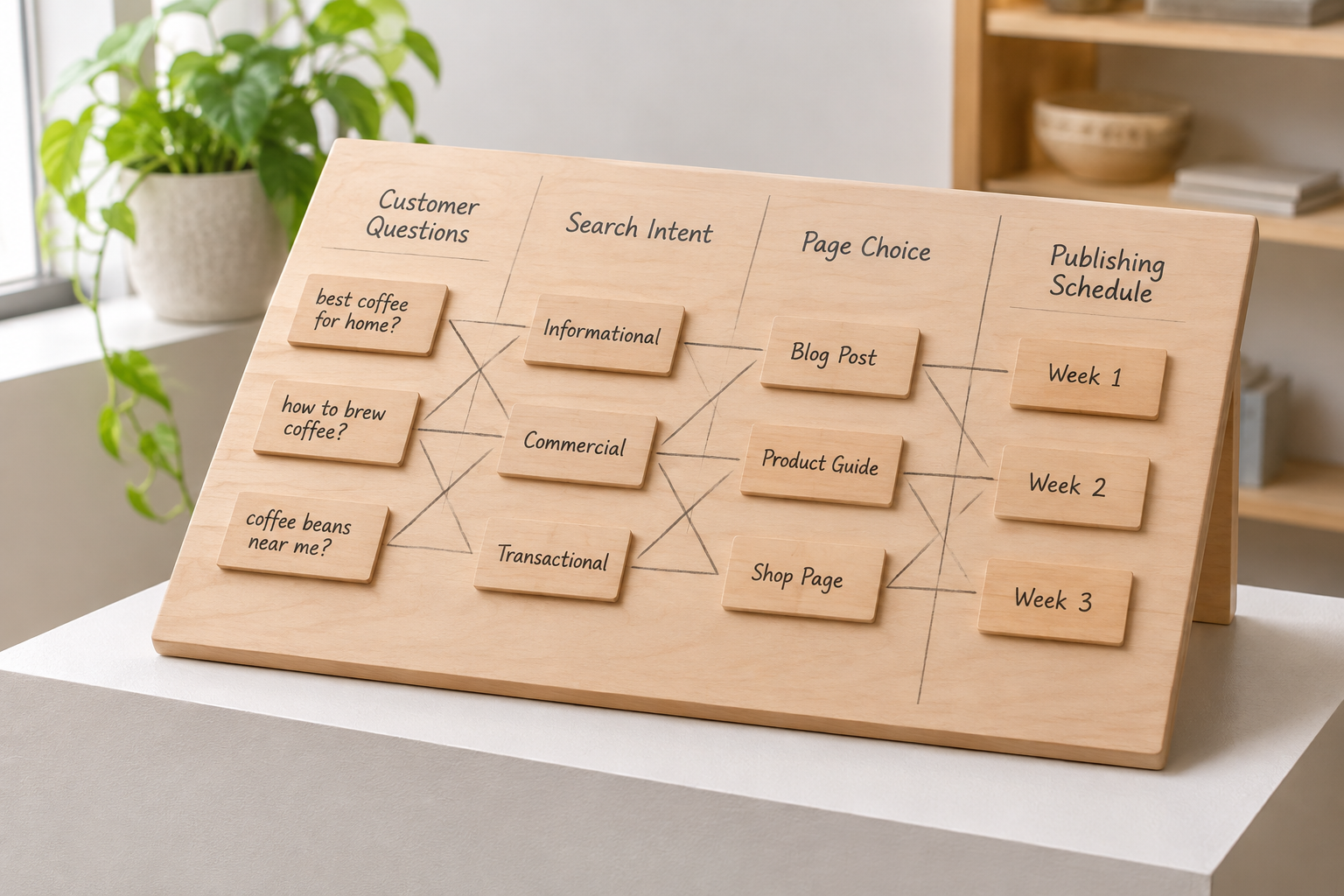
Keyword research and strategy with keyword planner starts with finding terms relevant to your customers, then deciding which deserve a page and what that page should accomplish. Google Keyword Planner can suggest ideas and provide directional search data, but it cannot choose your audience, interpret every search or guarantee organic rankings. The useful work is combining its data with judgement.
What Can Keyword Planner Actually Tell You?
Google Keyword Planner is a Google Ads tool designed to help advertisers discover keywords and plan campaigns. For SEO, it is a useful starting point: you can enter topics or a website, explore related ideas and examine estimates such as average monthly searches. You will need a Google Ads account to use it; account setup and the data available to you may vary.
The distinction matters. An advertising tool can reveal language that searchers use, but it does not directly measure how difficult it will be to rank an article organically. Nor does a suggested keyword automatically fit your business. Treat the export as a set of leads to investigate, not a ready-made publishing calendar.

Start with a clear question: what do prospective customers need to learn, compare or solve before they can use your product or service? A useful seed might describe a problem, a service category, a location or a common task. Specific starting points generally make it easier to spot relevant suggestions than a broad term such as “marketing”.
Google explains the tool's core functions in its Keyword Planner guide. Use that documentation to check the current interface and account requirements rather than relying on an old screenshot or assuming every account sees identical data.
Keyword Research and Strategy With Keyword Planner: Myths vs Facts
The following distinctions help turn a list of suggestions into a strategy. None of the signals below should be used alone: a term may look promising in a spreadsheet but still be unsuitable once you examine the people searching for it and the pages already appearing in results.
| Myth | What is more useful to know | Practical response |
|---|---|---|
| The highest-volume term is always the best target. | Relevance, intent and the usefulness of your proposed page matter alongside estimated demand. | Compare a broad term with more specific alternatives before choosing. |
| Keyword Planner competition shows organic ranking difficulty. | Its competition data relates to advertisers, not an organic SEO difficulty score. | Inspect organic search results and assess what competing pages provide. |
| Every keyword needs its own article. | Related phrases can often be answered on one coherent page. | Group terms by the need behind the search, then check the results. |
| Search volume is an exact traffic forecast. | Planner figures are estimates, and visibility does not translate directly into visits. | Use volume directionally and revisit decisions with your own site data. |
| Publishing automatically means publishing without review. | Automation handles workflow; someone still needs to set standards and check content. | Assign ownership, review rules and a correction process. |
Myth: volume is the whole opportunity. A broad phrase can attract a large and varied audience, many of whom may not need what you offer. A more specific phrase can be valuable when it points to a real customer question you can answer well. Neither choice is automatically right: compare the likely visitor's need with your business's ability to help.
Myth: suggested terms are Google's recommended SEO targets. Keyword Planner generates ideas in an advertising context. Some suggestions may describe a different product, an unrelated audience or a query you cannot answer authoritatively. Keep the relevant ideas and discard the rest, even if a number beside them looks attractive.

Myth: a spreadsheet can settle every decision. Data helps you narrow the field, but search results add context. Open a private browsing window, use the relevant location settings where possible and look at the page types that appear. Results can vary by location, device and other factors, so treat what you see as evidence rather than a universal ranking snapshot.
How Do You Find Useful Keyword Ideas?
Begin with a short list drawn from your actual business. Customer questions, service descriptions, support enquiries and sales conversations are useful sources. If you manage an agency, repeat this exercise for each client: the same phrase may mean different things to different audiences, and account access should reflect who is responsible for each site.
- Describe the offer. List the products, services and problems the site genuinely covers. Note which locations or customer types matter.
- Enter seed terms. In Keyword Planner, use the keyword discovery option and enter a small set of closely related phrases. You can also explore ideas using a relevant website where the tool supports it.
- Set the context. Check location, language and the selected search network before interpreting estimates. A national audience and a local service area call for different settings.
- Review the suggestions. Remove irrelevant meanings, competitors you do not intend to discuss and terms outside the site's expertise or offer.
- Save the candidates. Export or record the terms with their available estimates, then add your own notes about audience, intent and possible page type.
- Check the results. Search for a shortlist and inspect the organic pages. Look for what they answer, the level of detail and whether the results match the page you could realistically create.
For example, a hypothetical independent garden-maintenance business might start with “garden maintenance”, “garden clearance” and its service area. It could find that some suggestions concern do-it-yourself advice while others indicate a search for a provider. Those needs may deserve different pages, even when they share vocabulary. The business should confirm that it actually offers the service before creating a page about it.
Do not assume a keyword with limited displayed data is worthless. It might represent a specific customer question, especially in a narrow market. Equally, do not build an entire plan on a term simply because it sounds relevant. Check whether you have enough knowledge and evidence to provide a genuinely useful answer.

If you need a more detailed process for collecting and refining ideas, use the keyword research strategy checklist alongside your Planner export. The checklist is especially helpful when several people contribute ideas and you need a consistent way to decide what stays.
Which Keyword Planner Numbers Matter for SEO?
Average monthly searches can help you compare apparent interest in different phrases. It is an estimate, not a promise of visitors. A page may appear for several related searches, while a search result may satisfy a user without a click. The figure also tells you little about whether visitors are likely to become customers.
Competition is frequently misunderstood. In Keyword Planner, it concerns competition among advertisers for a keyword. High advertising competition may suggest commercial interest, but it does not prove that organic results are hard to enter. Low advertising competition does not mean that an organic page will rank easily. Inspect the actual results and consider the quality, relevance and type of pages already there.
Bid estimates are advertising signals, not prices for organic traffic. They can prompt a closer look at commercial intent, but a costly advertising keyword is not automatically the best article topic. Consider whether the searcher wants to buy, compare suppliers, learn a process or solve a problem without purchasing anything.
Location and date context affect interpretation. A seasonal business should look beyond an overall average where monthly trends are available. A location-specific business should check that its settings reflect the area it serves. Record the settings and date with your export so a teammate can understand what the figures represent later.
If Planner displays ranges rather than precise figures, avoid pretending that one term has a decisive numerical advantage over another in the same range. Use relevance, search results and customer knowledge to make the decision. When better site-specific data becomes available, revisit your assumptions.
How Do You Turn Keywords Into a Content Plan?
A content plan connects a search need to a useful page, an owner and a next action. It does not need a separate article for every variation. Start by clustering phrases that appear to ask the same underlying question, then compare search results to see whether the same kinds of pages appear for each phrase.
For each cluster, record a primary topic, supporting phrases, intended reader, likely intent, proposed page type and the existing page that might already satisfy the need. Add an owner and a review date. This simple record helps prevent overlapping articles and makes it easier to explain why a topic was selected.
Choose the page type that fits the task. An informational question may need a practical guide; a search for a local provider may be better served by a clear service page. A comparison search may call for a balanced explanation of options. Do not force every query into a blog article just because your calendar has room for one.
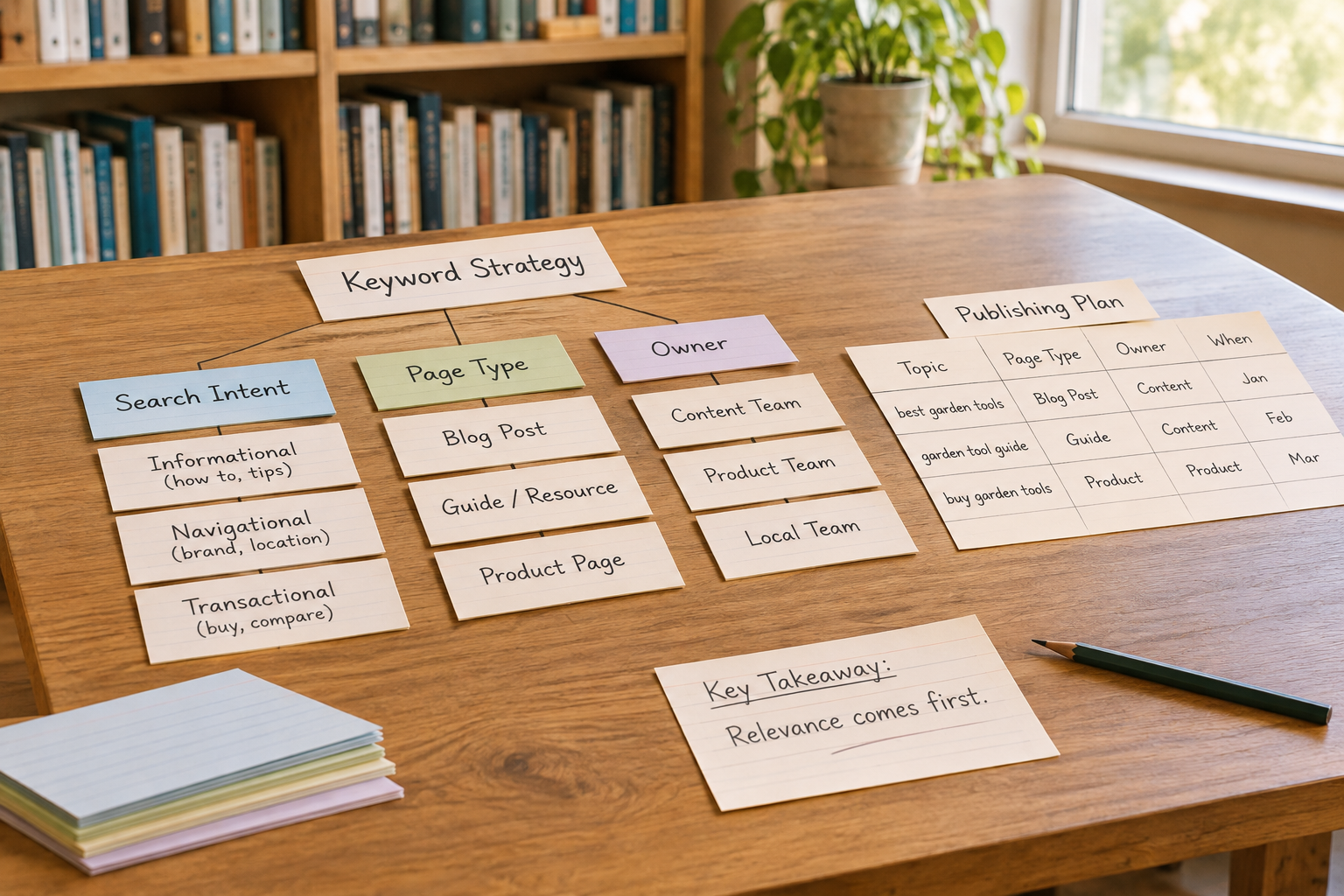
Before creating a new page, audit what is already live. An existing article may need a clearer answer, updated information or a more helpful internal link rather than a replacement. If two pages serve substantially the same need, review their purpose and performance before changing either; combining or redirecting content requires care and should not be an automatic response.
Prioritise with a qualitative scale such as high, medium and low for customer relevance, usefulness, effort and confidence in the available evidence. This is a decision aid, not a mathematical prediction. A topic can move up the list because it answers a frequent customer question even when Planner shows modest demand; another can wait because the business lacks the expertise to cover it properly.
For a fuller workflow, see the Keyword Planner research workflow. Adapt it to your publishing capacity rather than treating a checklist as a requirement to produce more pages than your team can maintain.
If the research is sound but publishing keeps slipping, Epicurus One can help turn the plan into a repeatable workflow. It finds keyword opportunities, writes on-brand articles and schedules publishing. You can connect WordPress, Shopify or Wix, or publish via Make or Zapier. Start a free trial to explore the workflow; the stated trial lasts three days and delivers daily articles.
Can You Automate Publishing Without Losing Control?
Yes, provided you decide what requires human oversight. Automation can reduce the work of moving content from a topic list into a calendar and then onto a website. It does not establish whether a claim is accurate, whether advice is suitable for your audience or whether the final page reflects your business.
Set a review process before increasing publishing frequency. Identify who checks facts, links, brand tone and sensitive claims; decide which articles require approval before publication; and make corrections straightforward after a page is live. If you work with clients, agree who owns each approval and who has access to each site.
- Before drafting: confirm the audience, search intent, page purpose and any claims that need reliable sources.
- Before publishing: check the answer is useful, links work, examples are clearly labelled and the page does not duplicate an existing one without a reason.
- After publishing: review whether the page is indexed and attracting relevant queries, and update it when the offer or information changes.

Epicurus One includes a drag-and-drop content calendar, team access controls and support for multiple sites from one account. Those features can organise the workflow, but your team should still agree on editorial standards. For a broader look at connecting drafting and publication, read the automated content creation and posting playbook.
Google's guidance on helpful, reliable, people-first content is a useful reference when setting those standards. The important question is whether the finished page helps its intended reader, not whether a tool produced it or whether it repeats a target phrase a particular number of times.
Watch a Keyword Planner Walkthrough
A current demonstration can help you locate the discovery and filtering options before you begin. Interfaces change, so compare any video with Google's current documentation and pay attention to the account and location settings used by the presenter.
As you watch, focus on the decisions behind the clicks: why a seed phrase was chosen, which suggestions were removed and how a potential topic was matched to a page. Those decisions are more transferable than memorising a sequence of interface labels.
Frequently Asked Questions
Is Google Keyword Planner free to use?
Keyword Planner is a tool within Google Ads. Google provides it for keyword discovery and campaign planning, but you need a Google Ads account to access it. Setup requirements and the level of detail shown can vary, so check Google's current guidance. Do not assume that every account will display the same search-volume figures.
Should I target keywords with low search volume?
Sometimes. A specific phrase may capture an important customer question even if its displayed volume is low or unavailable. Check that the topic fits your audience and that you can answer it well. Consider whether it belongs in an existing page before commissioning a separate article, and weigh the work against other priorities.
How many keywords should one page target?
There is no useful fixed number. Give the page one clear purpose and cover closely related phrases where they help explain the topic. If two queries imply different needs or produce noticeably different kinds of results, separate pages may be more appropriate. Write for the reader rather than inserting variations to meet a count.
Does Keyword Planner show whether my page will rank?
No. Its estimates can inform topic selection, but they do not predict an individual page's organic ranking. Review search intent, competing pages, your site's existing content and the quality of your proposed answer. After publication, use your own search performance data to learn which queries and pages warrant further attention.
How often should I revisit my keyword plan?
Review it when your services, audience or search results change, and at a regular interval your team can sustain. Seasonal businesses may also want to plan around relevant periods. Use the review to update existing pages, investigate emerging customer questions and remove topics that no longer match the offer, rather than adding articles by default.
Ready to put a practical keyword plan into motion? Explore Epicurus One and start your free trial, or scan your site free in about ten seconds.